
An ERP system is a business management system that connects different processes, such as finance, inventory, sales, and operations, into a single system, allowing businesses to manage data, workflows, and decisions in one place.
Instead of managing data separately across departments, an ERP system creates a structured environment where all business activities are connected through a centralized data flow. This allows businesses to track operations in real time, reduce manual work, and improve coordination between teams.
ERP is not just software—it functions as a business operating system that controls how information moves, how processes are executed, and how decisions are made across the organization.
How ERP Systems Expanded to Cover All Core Business Functions?
ERP systems expanded to cover all core business functions through a gradual evolution from simple, limited-purpose software into fully integrated enterprise platforms.
Before the 1990s, ERP was primarily just an acronym associated with basic planning tools and had a narrow scope. However, by the mid-1990s, advancements in technology and increasing business complexity led ERP systems to integrate multiple core functions—such as finance, human resources (HR), manufacturing, supply chain, sales, and procurement—into a single unified system.
This shift toward integration enabled organizations to centralize data, improve cross-departmental collaboration, and create a single source of truth. As a result, ERP systems became essential not only for businesses but also for governments and non-profit organizations seeking efficiency, transparency, and better decision-making.
According to Gartner, Inc., the ERP market was valued at around $35 billion in 2021. With the rise of digital transformation and cloud-based solutions, ERP systems have continued to evolve rapidly and are projected to reach approximately $116 billion by 2026, reinforcing their role as a critical backbone of modern enterprise operations.
How ERP Systems Work in Real Business Operations
ERP systems work by:
- Centralizing data across all departments
- Processing data (input → processing → output)
- Integrating finance, HR, supply chain, and manufacturing
- Enabling real-time data flow and synchronization
- Connecting departments through shared workflows
- Generating instant reports and analytics
- Maintaining a single source of truth
- Improving control and operational efficiency
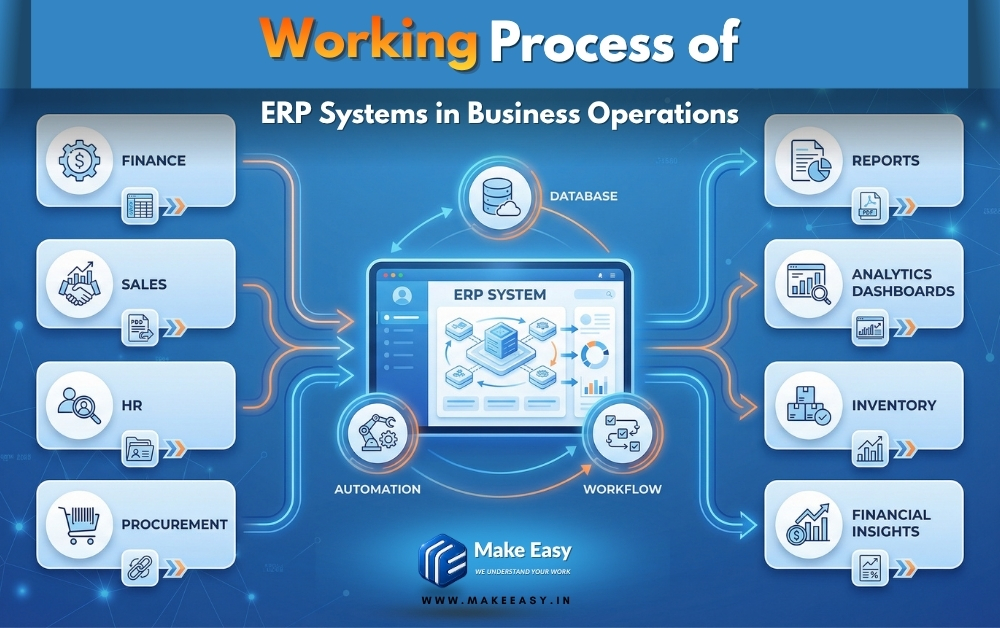
This image illustrates how ERP systems work in real business operations by showing the flow of data (input → processing → output), cross-department integration, and real-time reporting and control within a unified platform.
Data flow (input → processing → output)
ERP systems operate through a structured data flow where input, processing, and output are seamlessly connected within a centralized database. Data is entered from multiple departments such as accounting, sales, procurement, and manufacturing, then processed in real time using integrated workflows and business rules.
This processed data is transformed into meaningful output such as reports, dashboards, financial statements, and analytics, enabling organizations to maintain accuracy, consistency, and a single source of truth across all business processes.
Cross-department integration
ERP systems integrate multiple business functions into a unified platform, allowing departments like finance, human resources (HR), supply chain, sales, and operations to work with shared data. This cross-department integration eliminates data silos, reduces duplication, and ensures that every department accesses the same real-time information.
As a result, collaboration improves, workflows become more efficient, and organizations can streamline their core business processes across enterprise, mid-sized, and small business environments.
Real-time reporting and control
ERP systems provide real-time reporting and control by continuously tracking transactions, operations, and performance metrics across the organization. This enables businesses to generate instant reports, monitor financials, manage inventory, and oversee production and logistics with complete transparency.
Real-time insights support better decision-making, improve operational control, and help organizations respond quickly to changes, ultimately driving productivity, cost savings, and overall business performance.
Core Components of an ERP System
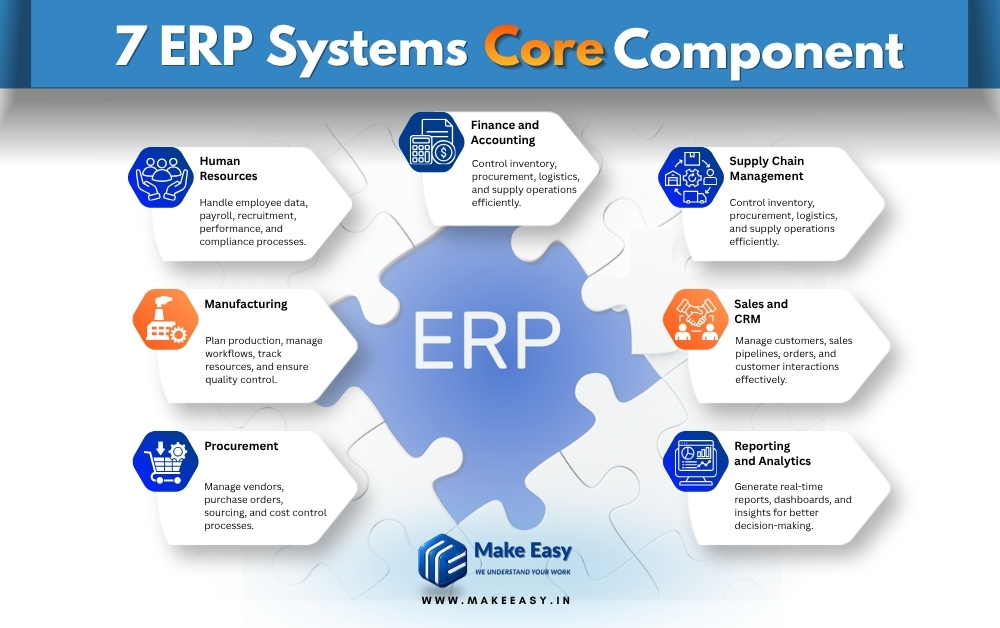
ERP systems are built around integrated modules that manage and automate core business functions within a centralized platform. These components work together to ensure seamless data flow, cross-department collaboration, and real-time visibility across the organization.
Finance and Accounting
The finance and accounting module manages core financial operations such as general ledger, accounts payable, accounts receivable, budgeting, and financial reporting. It helps organizations maintain accurate financial data, ensure compliance, and generate real-time financial insights for better decision-making.
Human Resources (HR)
The HR module handles employee-related processes including recruitment, payroll, attendance, performance management, and training. It centralizes employee data and helps streamline workforce management while improving productivity and compliance.
Supply Chain Management
This component manages the flow of goods and services, including procurement, inventory management, order processing, and logistics. It ensures efficient supply chain operations, reduces costs, and improves demand forecasting and inventory control.
Manufacturing
The manufacturing module supports production planning, scheduling, bill of materials (BOM), and quality control. It helps businesses optimize production processes, reduce waste, and maintain consistency in manufacturing operations.
Sales and Customer Relationship Management (CRM)
This module manages sales processes, customer interactions, order tracking, and revenue generation. It helps businesses improve customer relationships, increase sales efficiency, and gain insights into customer behavior.
Procurement
The procurement module handles purchasing activities, vendor management, and purchase orders. It ensures the timely sourcing of materials and services while controlling costs and maintaining supplier relationships.
Reporting and Analytics
This component provides real-time reporting, dashboards, and data analytics across all modules. It enables organizations to monitor performance, identify trends, and make data-driven decisions with complete visibility.
12 Key Concepts of ERP Systems
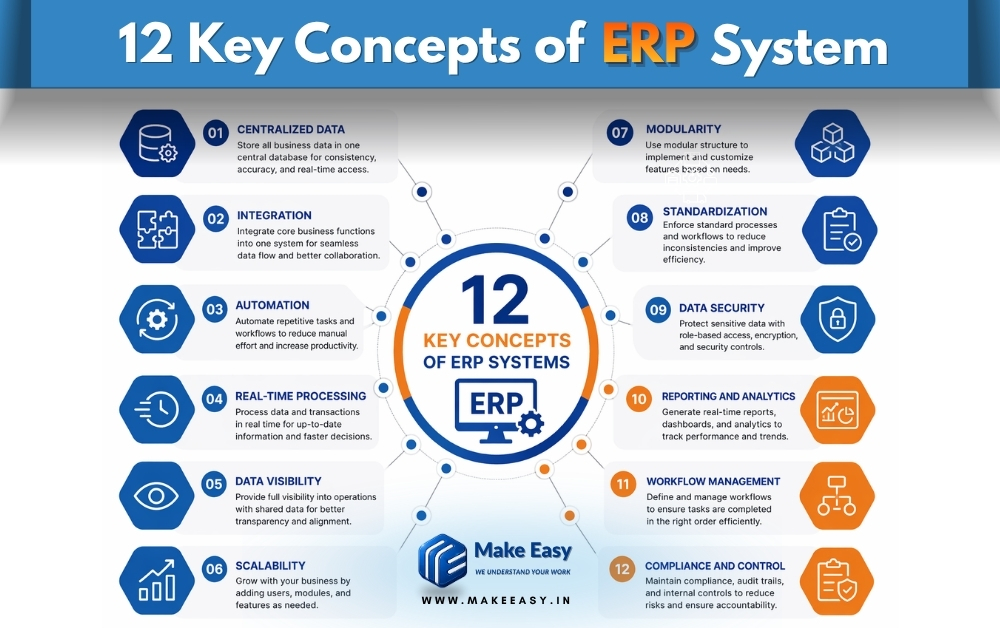
ERP systems are built on key concepts that enable centralized data management, process automation, and seamless integration across all business functions. These concepts ensure efficiency, transparency, and real-time decision-making within an organization.
1. Centralized Data
ERP systems store all business data in a single centralized database, ensuring consistency and accuracy across departments.
This eliminates data duplication and creates a single source of truth, allowing teams to access reliable information in real time. As a result, organizations improve coordination and reduce data conflicts.
2. Integration
ERP integrates core business functions such as finance, HR, supply chain, and manufacturing into one unified system.
This integration enables seamless data flow between departments and removes silos, improving collaboration and operational efficiency across the organization.
3. Automation
ERP systems automate repetitive tasks like data entry, invoicing, and reporting using predefined workflows.
This reduces manual effort, minimizes human errors, and increases productivity while allowing teams to focus on higher-value activities.
4. Real-Time Processing
ERP processes transactions and data in real time, ensuring that all information is always up to date. This helps businesses respond quickly to changes, monitor operations continuously, and make faster, data-driven decisions.
5. Data Visibility
ERP provides complete visibility into business operations by allowing different departments to access shared data. This transparency improves decision-making, enhances collaboration, and ensures everyone is aligned with business goals.
6. Scalability
ERP systems are designed to grow with the business, allowing organizations to add new users, modules, and features as needed. This flexibility makes ERP suitable for small, mid-sized, and enterprise-level businesses.
7. Modularity
ERP is built using modules such as finance, HR, CRM, and supply chain, which can be implemented individually or together. This modular approach allows businesses to customize the system based on their specific needs.
8. Standardization
ERP enforces standardized processes and workflows across all departments, reducing inconsistencies and improving efficiency. This helps organizations maintain uniform operations and better control over business activities.
9. Data Security
ERP systems include advanced security features like role-based access control and data encryption to protect sensitive business information. This ensures that only authorized users can access critical data.
10. Reporting and Analytics
ERP provides real-time reports, dashboards, and analytics to track performance and identify trends. These insights help organizations make informed decisions and continuously improve business processes.
11. Workflow Management
ERP systems define and manage workflows to ensure tasks are completed in the correct sequence. This improves process efficiency, reduces delays, and enhances overall productivity.
12. Compliance and Control
ERP helps businesses maintain compliance with regulations by keeping accurate records and audit trails. It also strengthens internal controls, reducing risks and ensuring accountability across operations.
Types of ERP Systems
ERP systems can be classified based on deployment models and business use cases. Their main types include Cloud ERP, On-Premise ERP, Hybrid ERP, and industry-specific or general ERP systems; all of these offer varying levels of flexibility, control, scalability, and customization, depending on the organization’s needs.
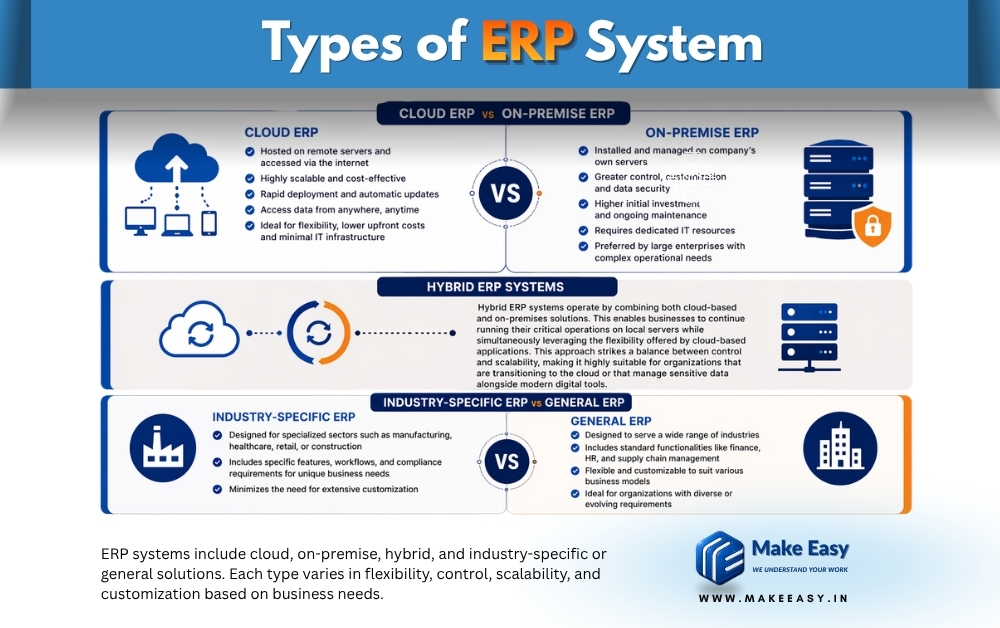
Cloud ERP vs On-premise ERP
Cloud ERP is hosted on remote servers and accessed via the internet, making it highly scalable and cost-effective. It enables businesses to deploy rapidly, receive automatic updates, and access data from anywhere. Cloud ERP is ideal for organizations seeking flexibility, lower upfront costs, and minimal IT infrastructure requirements.
On the other hand, On-premise ERP is installed and managed on a company’s own servers. It offers greater control, customization, and data security, but requires a higher initial investment, ongoing maintenance, and dedicated IT resources. It is often preferred by large enterprises with complex operational requirements.
Hybrid ERP systems
Hybrid ERP systems operate by combining both cloud-based and on-premises solutions. This enables businesses to continue running their critical operations on local servers while simultaneously leveraging the flexibility offered by cloud-based applications. This approach strikes a balance between control and scalability, making it highly suitable for organizations that are transitioning to the cloud or that manage sensitive data alongside modern digital tools.
Industry-specific ERP vs general ERP
Industry-specific ERP systems are designed for specialized sectors such as manufacturing, healthcare, retail, or construction. These systems incorporate specific features, workflows, and compliance requirements tailored to the unique needs of a particular business, thereby minimizing the need for extensive customization.
In contrast, general-purpose ERP systems are designed to cater to the needs of a wide range of industries. They feature standard functionalities such as finance, HR, and supply chain management. These systems are flexible and can be customized to suit various business models. Consequently, they are well-suited for organizations with diverse or constantly evolving requirements.
ERP System Examples (Real Business Use Cases)
Global companies widely use ERP systems to manage operations, centralize data, and automate business processes across departments. These real-world examples show how different organizations use ERP systems to improve efficiency, scalability, and decision-making in their daily operations.
Amazon – Supply Chain and Inventory Management
Amazon utilizes systems such as ERP to manage its vast supply chain, inventory, and order fulfillment processes. By integrating warehousing, logistics, and real-time data tracking, Amazon ensures rapid delivery, accurate inventory control, and seamless operations across its global network.
Tesla – Manufacturing and Production Planning
Tesla relies on an ERP system to streamline its manufacturing, production scheduling, and supply chain operations. ERP helps Tesla manage complex production workflows, track components, and maintain efficiency in its electric vehicle manufacturing process.
Coca-Cola – Financial and Operational Integration
Coca-Cola utilizes an ERP system to integrate financial data, procurement, and supply chain operations across various regions. This centralized approach enhances financial reporting, standardizes processes, and improves decision-making capabilities on a global scale.
Nike – Demand Planning and Order Management
Nike leverages ERP systems for demand forecasting, inventory management, and order processing. ERP enables Nike to align production with market demand, optimize supply chain performance, and improve customer satisfaction.
Walmart – Inventory and Logistics Optimization
Walmart uses ERP systems to manage inventory, suppliers, and logistics across thousands of stores. Real-time data and automation help Walmart maintain stock levels, reduce costs, and ensure efficient distribution.
ERP Integration with Other Business Systems
ERP systems become more powerful when integrated with other business tools, enabling seamless data flow, automation, and real-time synchronization across platforms. These integrations eliminate data silos, improve accuracy, and create a unified ecosystem for managing operations, customers, finances, and digital channels.
ERP + CRM integration
Integrating ERP with CRM systems connects customer data with core business operations. This allows sales, marketing, and support teams to access real-time information on orders, invoices, and customer history. As a result, businesses can improve customer relationships, streamline sales processes, and deliver a more personalized experience.
ERP + accounting tools
ERP integration with accounting tools ensures accurate financial data management by synchronizing transactions, invoices, expenses, and reports. This reduces manual data entry, minimizes errors, and provides real-time financial visibility, helping organizations maintain compliance and make informed financial decisions.
ERP + eCommerce systems
Connecting ERP with eCommerce platforms enables automatic synchronization of product data, inventory levels, orders, and customer information. This integration helps businesses manage online sales efficiently, avoid stock issues, and provide a seamless shopping experience for customers.
API and system connectivity
ERP systems use APIs (Application Programming Interfaces) to connect with various software and external systems. APIs enable real-time data exchange, automation, and scalability, allowing businesses to integrate multiple tools and create a flexible, connected digital infrastructure.
ERP Planning and Implementation Overview
ERP planning and implementation is a structured process that involves selecting, configuring, and deploying an ERP system to align with an organization’s business processes and goals. It begins with identifying business requirements, evaluating ERP solutions, and defining a clear implementation strategy based on company size, industry, and operational needs.
The process includes data migration, system configuration, customization, and integration with existing tools such as CRM, accounting software, and eCommerce platforms. Proper planning ensures that all core functions—finance, HR, supply chain, and operations—are seamlessly integrated into a unified system with minimal disruption.
User training, change management, and testing play a critical role in successful ERP implementation. Organizations must ensure that employees understand the system, workflows are optimized, and potential issues are resolved before full deployment. Continuous monitoring and support after implementation help improve system performance, ensure data accuracy, and maximize return on investment (ROI).
A well-executed ERP implementation enhances efficiency, improves data visibility, reduces operational costs, and enables organizations to scale effectively in a competitive business environment.
Advantages of ERP Systems
ERP systems provide organizations with a centralized and integrated platform to manage business processes efficiently, improve data accuracy, and enhance decision-making across departments.
Advantages of ERP systems include:
- Centralizes data across all departments
- Provides a single source of truth
- Automates business processes and workflows
- Improves operational efficiency and productivity
- Enables real-time reporting and insights
- Enhances cross-department collaboration
- Reduces manual errors and data duplication
- Streamlines core business operations
- Improves financial management and control
- Supports better planning and forecasting
- Scales with business growth
- Enhances data security and access control
- Reduces operational costs
- Improves customer experience and service
- Increases overall business performance
Disadvantages and Limitations of ERP Systems
ERP systems offer significant benefits, but they also come with challenges that organizations must consider during planning, implementation, and long-term usage.
Disadvantages of ERP systems include:
- High initial implementation cost
- Complex and time-consuming deployment process
- Requires significant training and user adoption
- Customization can be expensive and difficult
- Ongoing maintenance and upgrade costs
- Dependence on vendors and service providers
- Risk of implementation failure if poorly planned
- Data migration challenges from legacy systems
- Potential disruption to business operations during setup
- Requires strong change management processes
- Integration issues with existing systems
- Performance issues if not properly configured
- Security risks if not managed correctly
- Limited flexibility in some ERP solutions
- Resistance from employees to adopt new systems
ERP vs CRM vs Accounting Software
| Feature / Use Case | ERP (Enterprise Resource Planning) | CRM (Customer Relationship Management) | Accounting Software |
| Primary Purpose | Manage and integrate all business processes | Manage customer relationships and sales | Manage financial transactions and records |
| Core Functions | Finance, HR, supply chain, manufacturing, operations | Sales pipeline, customer data, marketing automation | Bookkeeping, invoicing, payroll, tax management |
| Data Scope | Centralized data across all departments | Customer-focused data and interactions | Financial data only |
| Integration Level | Fully integrated system across business functions | Limited to sales and customer-related processes | Limited to accounting and finance tasks |
| Real-Time Insights | Provides real-time insights across entire business | Provides insights into sales and customer behavior | Provides financial reports and statements |
| Best For | Enterprises and growing businesses needing full control | Businesses focused on sales growth and customer engagement | Small to mid-sized businesses managing finances |
| Examples | SAP, Oracle, Microsoft Dynamics | Salesforce, HubSpot | QuickBooks, Tally |
Best ERP Systems in the Market
ERP systems vary based on scalability, flexibility, support, and business needs. Today, the global ERP market is dominated by cloud-based and enterprise-grade solutions, while some systems focus on ground-level execution and real-world business control.
Top ERP systems in the market include Flash ERP, SAP ERP, Oracle ERP, and Odoo ERP—each serving different business needs from local operational control to global enterprise management.
Flash ERP
Flash ERP is an offline-based ERP system designed for real business operations at the ground level, especially in Indian markets. Unlike typical cloud ERP systems, Flash ERP focuses on data control, local accessibility, and direct business impact.
Its offline architecture reduces the risk of data breaches and dependency on internet connectivity, making it more secure for sensitive business data. One of its biggest strengths is on-ground, walk-in support, which is often missing in global ERP systems that rely on remote consultants.
Flash ERP is particularly effective for businesses struggling with gaps in inventory, accounting, and operational workflows. By streamlining these areas, it helps improve efficiency and can significantly increase profitability. Businesses that adopt such systems often prefer them long-term due to their simplicity, control, and direct impact on operations.
SAP ERP overview
SAP ERP is one of the most widely used enterprise systems globally, especially for large organizations with complex operations. It offers deep functionality across finance, supply chain, manufacturing, and HR, making it a strong choice for enterprises requiring industry-specific solutions.
SAP’s strength lies in its scalability, real-time processing, and advanced analytics, but it comes with high implementation costs and complexity, often requiring expert consultants.
Oracle ERP overview
Oracle ERP, particularly Oracle Fusion Cloud ERP, is a leading cloud-based solution known for its strong financial management and enterprise capabilities. It supports a wide range of business processes including procurement, CRM, and supply chain management.
Oracle ERP is ideal for mid-sized to large organizations looking for cloud scalability, automation, and modern user experience, though costs and customization can be challenging as the business grows.
Odoo ERP overview
Odoo ERP is a highly flexible and modular system, popular among small and medium-sized businesses. It offers a wide range of applications—from CRM and accounting to eCommerce and inventory—within a single platform.
Its open-source nature and affordability make it attractive, but it may require technical expertise for advanced customization and scaling.
How to choose best ERP
Choosing the best ERP system depends on your business size, industry, and operational needs. Key factors to consider include scalability, cost, customization, ease of use, and support availability.
Businesses that need global scalability and automation often prefer systems like SAP or Oracle, while those looking for flexibility and affordability may choose Odoo. For companies focused on ground-level execution, data control, and direct operational impact, offline and locally supported ERP solutions can offer a more practical advantage.
The right ERP is not the most popular one—it is the one that aligns with your business processes, solves real problems, and supports long-term growth.
When a Business Needs an ERP System
A business needs an ERP system when its operations become complex, data is scattered across multiple systems, and manual processes start slowing down growth. ERP becomes essential when organizations require centralized data, process automation, and real-time visibility to manage operations efficiently and make better decisions.
A business needs an ERP system when:
- Data is spread across multiple systems and spreadsheets
- Departments work in silos with limited communication
- Manual processes cause delays and errors
- Real-time data and reporting are not available
- Inventory management becomes difficult to track
- Financial data lacks accuracy and consistency
- Business growth becomes hard to manage with existing tools
- Decision-making is delayed due to lack of insights
- Customer experience and service quality decline
- Compliance and audit tracking become challenging
- Integration between tools (CRM, accounting, eCommerce) is missing
- Operational costs increase due to inefficiencies
- Scaling the business requires better systems and control
Common ERP Mistakes and Failure Reasons
ERP implementation can fail if not planned and executed properly, leading to cost overruns, operational disruption, and poor user adoption. Most failures occur due to lack of strategy, weak process alignment, and inadequate training rather than issues with the ERP system itself.
Common ERP mistakes and failure reasons include:
- Poor planning and unclear business requirements
- Choosing the wrong ERP system for the business
- Lack of top management support and involvement
- Inadequate user training and low adoption
- Ignoring change management processes
- Over-customization increasing complexity and cost
- Poor data migration from legacy systems
- Lack of integration with existing tools and systems
- Unrealistic budget and timeline expectations
- Weak project management and implementation strategy
- Not aligning ERP with actual business workflows
- Resistance from employees to new systems
- Insufficient testing before full deployment
- Ignoring post-implementation support and optimization
- Underestimating long-term maintenance and upgrade needs
Final Thoughts: ERP as a System, Not Just Software
ERP is not just software but a complete system that connects processes, people, and data. It creates a centralized environment where business operations become structured, automated, and aligned with organizational goals.
When implemented correctly, ERP transforms how a business operates by improving efficiency, decision-making, and scalability, making it a long-term foundation for sustainable growth.
FAQs
Grp and ERP are the same?
No, GRP and ERP are not the same. ERP (Enterprise Resource Planning) is used by businesses to manage core operations like finance, HR, supply chain, and manufacturing. GRP (Government Resource Planning) is a specialized version of ERP designed for government organizations to manage public sector processes, compliance, and administration.
is there any Free ERP software for small business
Yes, there are free ERP software options for small businesses. Some ERP systems offer open-source or freemium versions with basic features like accounting, CRM, inventory, and project management. However, advanced features, customization, and support usually require paid plans as the business grows.